Stream Music Stored in iCloud on Your iPhone
Want to stream music stored in iCloud from your iPhone? MusicStreamer is a powerful music player app that lets you access and play songs stored in iCloud directly from your device. With simple setup and seamless playback, you can enjoy your iCloud music collection without downloading every track.
You can also download individual songs, albums or playlists from iCloud for offline listening when you don't have an internet connection.
Save iPhone Storage by Streaming Your iCloud Music Library
Step 1: Add a Music Source in MusicStreamer
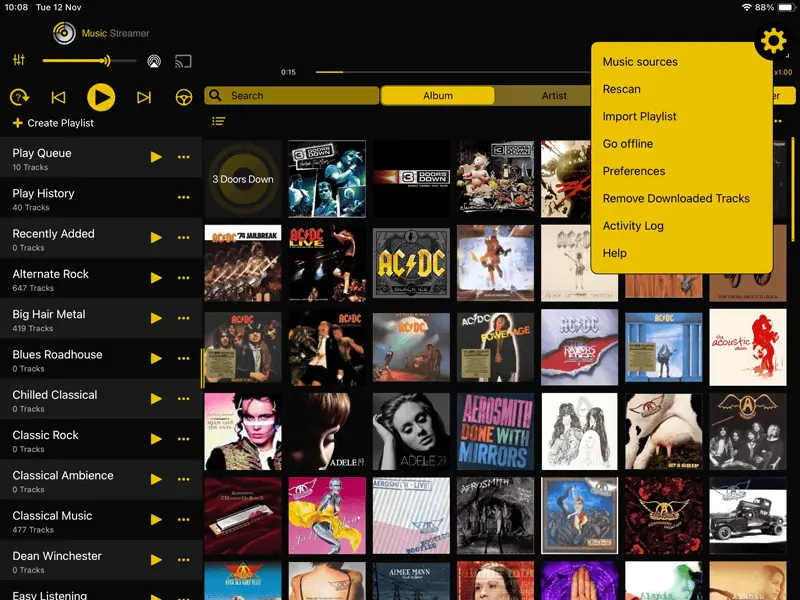
In MusicStreamer tap the Cog icon in the top right corner and select "Music Sources".
Then tap "Add Music Source".
Then select "Choose Music Folder".
Step 2: Name Your New Music Source
Give your new music source a name in the "Display Name" input.
Then tap "Set Folder".

Step 3: Select Your iCloud Music Folder
In the files selector popup, select your "iCloud Drive" location in the left hand pane.
Browse to where your music folder is stored and tap "Open".

Step 4: Complete Setup and Scan Your Library
Back in MusicStreamer tap "Done" then confirm the popup.
MusicStreamer will now scan your music collection.

WiFi
MusicStreamer can also play your music files from your computer to your iOS device over WiFi.

USB Drive
Plug in a USB Drive with your music library and play it directly on your iOS device with MusicStreamer.
Find out More

Download a free trial of MusicStreamer. Available on the App Store. The free version is restricted to 200 songs but allows you to try out all the features of MusicStreamer.

FAQ
-
Can I download music from iCloud Drive to iPhone without computer?
Yes, using MusicStreamer you can download any Album, Song or Even playlist from your iCloud storage. If your music is all purchased via Apple Music then you should be able to re-download those tracks from the store.
-
Q: Can I stream music stored in iCloud from an app?
Yes — MusicStreamer lets you play music stored in iCloud directly on your iPhone with a dedicated iCloud music player interface.
-
How do I use an iCloud music player on iPhone?
Simply connect your iCloud account in MusicStreamer and browse your iCloud music collection to play songs seamlessly.
-
Can I play iCloud music without downloading it?
MusicStreamer supports streaming your songs stored in iCloud, so you don’t need to download each track before playing it.
Free Trial

Download Now