User Guide Full Index
 Connect to...
 Navigation
File Listing Options
Navigation
File Listing Options
 Selecting and Copying Files
- File Selection Mode
- Selecting Images in the Image Viewer
- Copying Files
- Drag and Drop
- AirDrop Files
- Copy Large files with macOS Finder
- Share Files
- Copy to iOS Clipboard
- eMail Files
- Download Files Using URL
 Viewing Documents
Editing Documents
Annotate/Markup
Viewing Documents
Editing Documents
Annotate/Markup
 Bulk Rename Tools
- Bulk Rename - Add text to filenames
- Bulk Rename - Add Index or Counter
- Bulk Rename - Find and Replace
- Bulk Rename - Rename with Dates
- Bulk Rename - Rename using EXIF Data
 Search
 Creating and Editing PDFs
 Working with Images
 Playing Movies
 Playing Music
- Supported Music Types
- Play Modes
- Queueing Tracks
- Speed Up/Slow Down Playback
- AirPlay Music
- Chromecast Music
- Recording Audio into FileBrowser
 Sharing Folders
 Files App Integration
 Advanced
How to Bulk Rename Files in FileBrowser for Education
Connect to Anywhere and Bulk Rename Files from your iPad/iPhone
This guide explains how to rename many files simultaneously in FileBrowser for Education on your iPhone or iPad, using customizable rules for consistent file naming.
Add Text to File Names
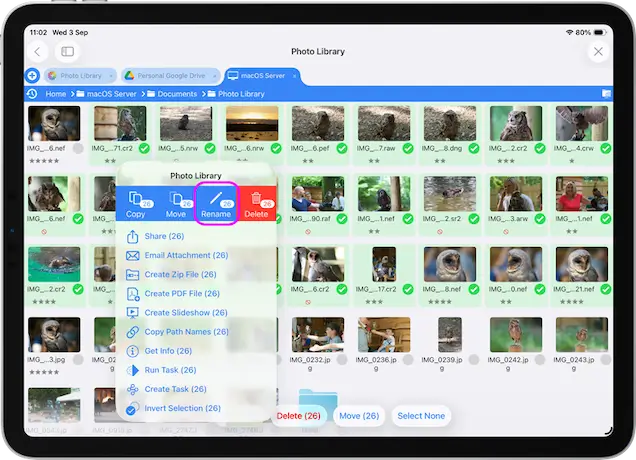
Select the files you want to rename and tap the toolbar actions icon, then select "Rename (x)" from the menu.
Note: Due to an iOS limitation images in the Photo Library cannot be renamed.
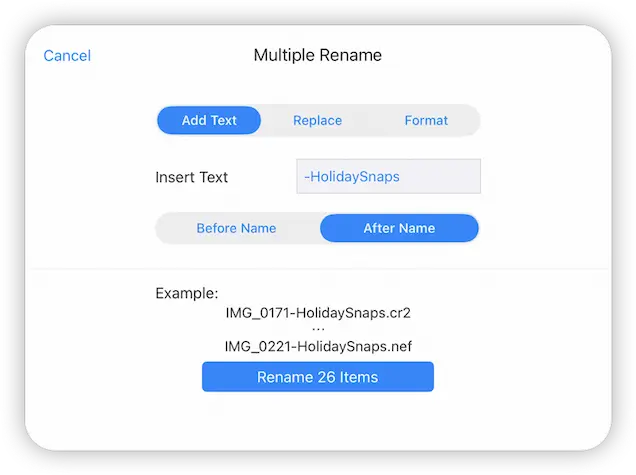
Select the "Add Text" tab.
Enter the text you want to add to each file name and choose where to place the text. You will see the example update to show what your filenames will look like.
Then tap "Rename X Items".