 User Guide Full Index
 Connect to...
- Connect to Mac
- Connect to Windows
- Connect to NAS Drives
- Connect to Cloud Storage
- USB Drives
- Map an App folder
 Navigation
File Listing Options
Navigation
File Listing Options
 Selecting and Copying Files
- File Selection Mode
- Selecting Images in the Image Viewer
- Copying Files
- Drag and Drop
- AirDrop Files
- Copy Large files with macOS Finder
- Share Files
- Copy to iOS Clipboard
- eMail Files
- Download Files Using URL
 Viewing Documents
Editing Documents
Annotate/Markup
Viewing Documents
Editing Documents
Annotate/Markup
 Bulk Rename Tools
- Bulk Rename - Add text to filenames
- Bulk Rename - Add Index or Counter
- Bulk Rename - Find and Replace
- Bulk Rename - Rename with Dates
- Bulk Rename - Rename using EXIF Data
 Search
 Creating and Editing PDFs
 Working with Images
- Rotate Images
- Convert Images
- Create Contact Sheets
- Rate Photos with XMP
- Remove GPS from Photos
- Edit IPTC Properties on Photos
- Slideshows
- - Chromecast Images
- - Airplay Photos
 Playing Movies
 Playing Music
- Supported Music Types
- Play Modes
- Queueing Tracks
- Speed Up/Slow Down Playback
- AirPlay Music
- Chromecast Music
- Cast Music to Alexa Devices
- Recording Audio into FileBrowser
 Sharing Folders
 Files App Integration
 WebDAV Server
 Sync and Backup
 Custom Tasks
- Create Custom Tasks
- Monitor a Folder for a Keyword and Download Hourly
- Download PDFs from the Last 7 Days
- Trim PDF Pages
- Change IPTC Properties on Images in Bulk
- Rotate Images in Bulk
- Automated Backup of Video Files from a Chosen Folder
- Automate Backup and Deletion of Files Older than a Chosen Date
- Remove GPS from Multiple Photos
- Convert Images in Bulk
 Advanced
- Deleted Files
- Compare Files and Folders
- Siri Reminders
- Siri Voice Shortcuts
- QR and BarCode Support
- Face ID Logins
- Kiosk Mode
- Family Sharing
- FileBrowser Professional Configuration Files
- Transfer FileBrowser Professional Settings
Configuration Files

Map App Folders
Map other apps shared folders such as Firefox's Download folder for instant access in FileBrowser Professional.
Map an App Folder
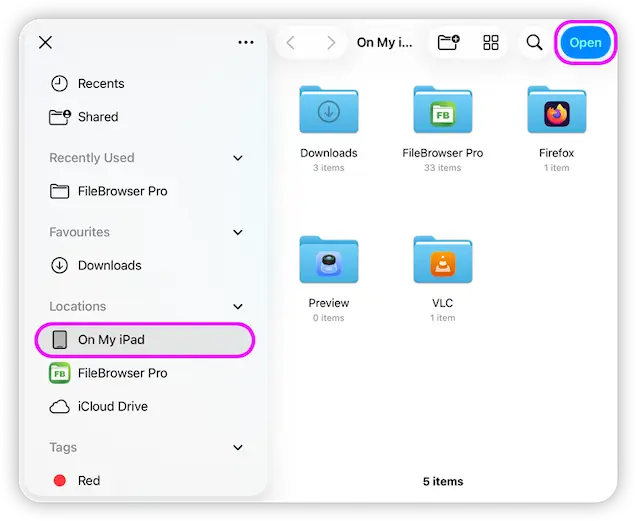
FileBrowser Professional can map the folders of other apps such as FireFox's Download folder or PDF Viewer's folder for easy access and manipulation.
- From FileBrowser Professional's Home screen tap "Add Location", then tap "App Folder"
- From here, tap "Select Location" and tap the "On My iPad" section in the sidebar and browse into an app's folder. Tap the "Open" here or browse into a sub-folder to add just that folder.
Map an iCloud Folder
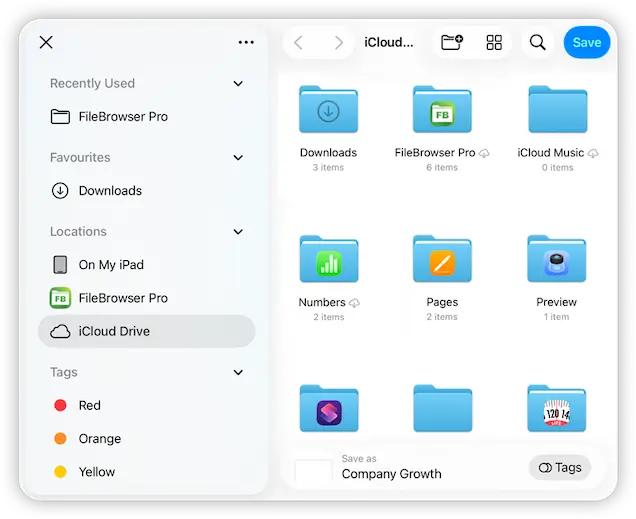
Map an iCloud folder for direct access in FileBrowser Professional.
- From FileBrowser Professional's Home screen tap "Add Location", then tap "iCloud Drive"
- From here, navigate into any folder. Tap the "Open" here or browse into a sub-folder to add just that folder.
Download Now


Compare FileBrowser
Versions


